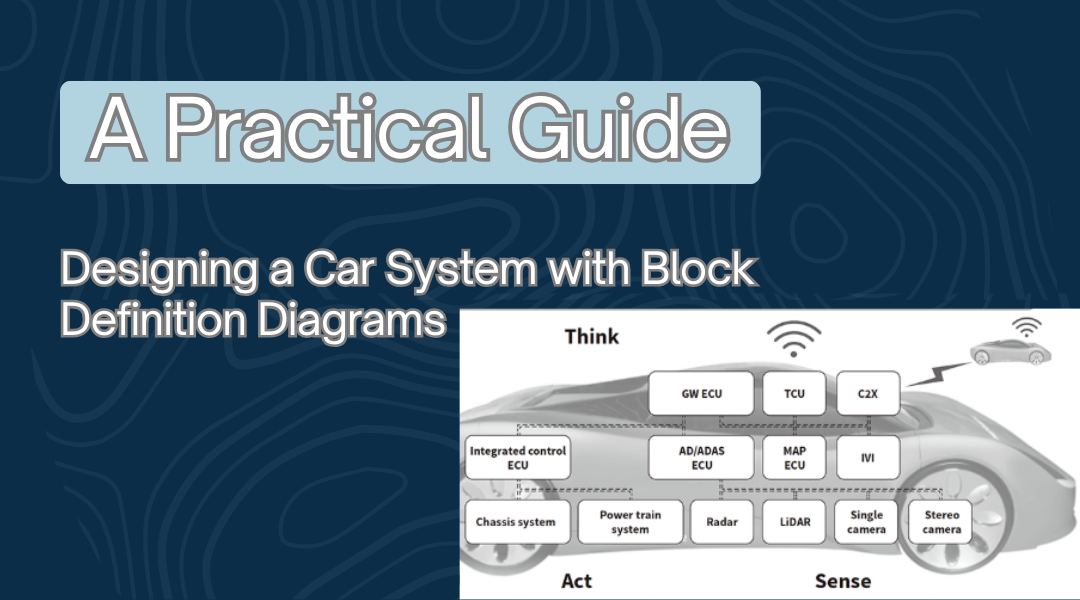
When engineers need to visualize the structure of a complex system like a car, Block Definition Diagrams (BDDs) provide a clear and organized way to break it down. Unlike vague sketches or lengthy documentation, a well-crafted BDD helps teams understand components, their properties, and how they interact—crucial for designing, troubleshooting, and improving automotive systems.
In this guide, we’ll walk through the process of building a BDD for a car system, using real-world examples and best practices to ensure clarity and precision.
Step 1: Defining the Purpose and Scope
Before diving into the diagram, we need to establish what we’re modeling and why.
- High-Level vs. Detailed View
- A high-level BDD might focus on major subsystems like the engine, transmission, and braking system.
- A detailed BDD could drill into sensors, control modules, and even software interactions.
Example:
If we’re designing an electric vehicle (EV), we might include blocks like:
- Battery Pack (with attributes like voltage and capacity)
- Motor Controller (with operations like adjustTorque())
- Regenerative Braking System (interacting with both the battery and wheels)
Step 2: Identifying Key Components
A car isn’t just a single machine—it’s a network of interconnected systems. Here’s how to identify the right blocks:
Core Blocks in a Typical Car System
- Powertrain (Engine/Motor, Transmission, Drivetrain)
- Chassis & Suspension (Frame, Wheels, Shock Absorbers)
- Control Systems (ECU, ABS, Infotainment)
- Safety & Comfort (Airbags, HVAC, Seat Controls)
Example:
Instead of a generic “Engine” block, we might specify:
- TurbochargedEngine (with attributes like boostPressure and maxRPM)
- HybridDriveUnit (combining electric motor and combustion engine)
Step 3: Adding Attributes and Operations
Each block should define what it is (attributes) and what it does (operations).
Example: Braking System
- Attributes:
- brakeType (e.g., “Disc” or “Drum”)
- sensorCount (for ABS)
- Operations:
- applyEmergencyStop()
- calibrateABS()
Example: Infotainment System
- Attributes:
- screenSize
- softwareVersion
- Operations:
- updateOS()
- connectBluetooth()
Step 4: Mapping Relationships Between Blocks
A car’s components don’t work in isolation—they communicate, depend on, and control each other.
Types of Relationships in a BDD
- Associations (Direct connections, e.g., Engine → Transmission)
- Generalizations (Inheritance, e.g., ElectricMotor is a type of Motor)
- Dependencies (One component relies on another, e.g., ECU needs Sensor data)
Example:
- Association: The Engine sends power to the Transmission.
- Dependency: The StabilityControl system relies on WheelSpeedSensors.
Step 5: Building the Diagram
Now, let’s piece it all together visually.
Best Practices for Layout
- Place central components (like the ECU or Engine) near the middle.
- Group related blocks (e.g., all braking components together).
- Use ports and interfaces to define how systems interact.
Example:
- A “Driver Assistance” block might have ports for:
- CameraInput (from front/rear cameras)
- RadarData (for adaptive cruise control)
Step 6: Reviewing and Refining the BDD
A diagram is only useful if it’s accurate and understandable.
Checklist for Validation
✅ Are all critical components included? (e.g., Did we forget the cooling system in an EV?)
✅ Do the relationships make sense? (e.g., Does the Transmission really connect to the Infotainment system?)
✅ Is the level of detail appropriate? (Too vague? Too cluttered?)
Tip: Run a walkthrough with mechanical and software engineers to catch missing links.
Final Thoughts
A well-designed Block Definition Diagram is more than just boxes and lines—it’s a blueprint for understanding how a car’s systems fit together. By following this structured approach, engineers can:
- Prevent design flaws early in development.
- Improve collaboration between mechanical, electrical, and software teams.
- Speed up troubleshooting when issues arise.
Whether you’re working on a traditional combustion car, a hybrid, or a fully autonomous vehicle, a clear BDD ensures everyone is on the same page—before the first prototype is even built.
Need a Starting Point?
Try sketching a basic BDD for a self-parking system, including:
- Ultrasonic Sensors (distance detection)
- Steering Control (adjusts wheel angle)
- ParkingECU (processes sensor data and executes maneuvers)
This exercise will help solidify the concepts before tackling more complex systems.